The order cards come in
Due (all of them, no cap) → new (up to n per day, 20 by default)- Due cards are never capped. A backlog does not shrink by being hidden; hiding it only makes it grow
- Cards with the same due time follow the vault’s order, so the sequence does not change between launches
- Re-asking within a session: if the interval after grading is 20 minutes or less, the card goes back to the end of the queue. A card pushed to 16 days by “Easy” does not come back today
- Skipping is not grading. Nothing is written to the review log, and the card does not return that day
Resuming a session
If a queue for the same deck on the same day is still open, reopening the app does not rebuild it. Rebuilding would wipe the grade count, the breakdown, and any card you pushed back with “Again”. Cards that came due in the meantime are appended to the end. Skipped cards do not come back — skipping was deliberate.
One card, start to finish
- The front (the question) appears. Tapping anywhere flips it (on Mac,
SpaceorEnter) - The back appears, with references already expanded, plus hint and note
- Grade in four steps (on Mac,
1–4)
Each button shows when the card comes back. That is not, however, what you choose on.

What the four grades mean
| Button | Meaning |
|---|---|
| Again | It did not come back |
| Hard | It took a while, but it came |
| Good | It came straight away |
| Easy | No thinking required |
Choose on whether it came back to you, not on how many days until you see it next. Picking by interval makes the same card mean different things to different people, and the scheduling stops being meaningful.
While your grade count is still low, the app shows these meanings on screen.
Undoing a grade (iOS)
“Show answer” and the grading buttons occupy the same spot, so one-handed, the second beat of a press misfires. The write to disk is therefore held back for a few seconds. Press “Undo” within that window and nothing reaches the review log.
- Only ever one grade is pending (the next grade commits the previous one first)
- The grace period expiring, leaving the screen, or the app going to the background all commit it
- Grades are ignored for 0.3 seconds after “Show answer”
- If the write fails, the grade is undone entirely — never a state where nothing is recorded but the whole app says otherwise
Three moves inside a session
| Move | What happens |
|---|---|
| Back one | The card you just saw comes up again (on Mac, ⌫) |
| Run it again | Re-queues every card you graded today, ignoring due dates |
| Copy | While reviewing you get the card’s ID only, not the text |
Back one
What you see is the same either way — the previous card returns — but underneath there are two cases.
- The write is still pending (within seconds) → the grade is undone too. Nothing was logged
- It has already been written → only the card comes back. The grade stands
Written lines are not deleted, because the review log being append-only is the one reason conflicts across devices resolve as a plain union. Grade it again and a new line is added — the fact that you did it twice that day stays true.
Mac and Android write the moment you press, so they are always the second case.
Run it again
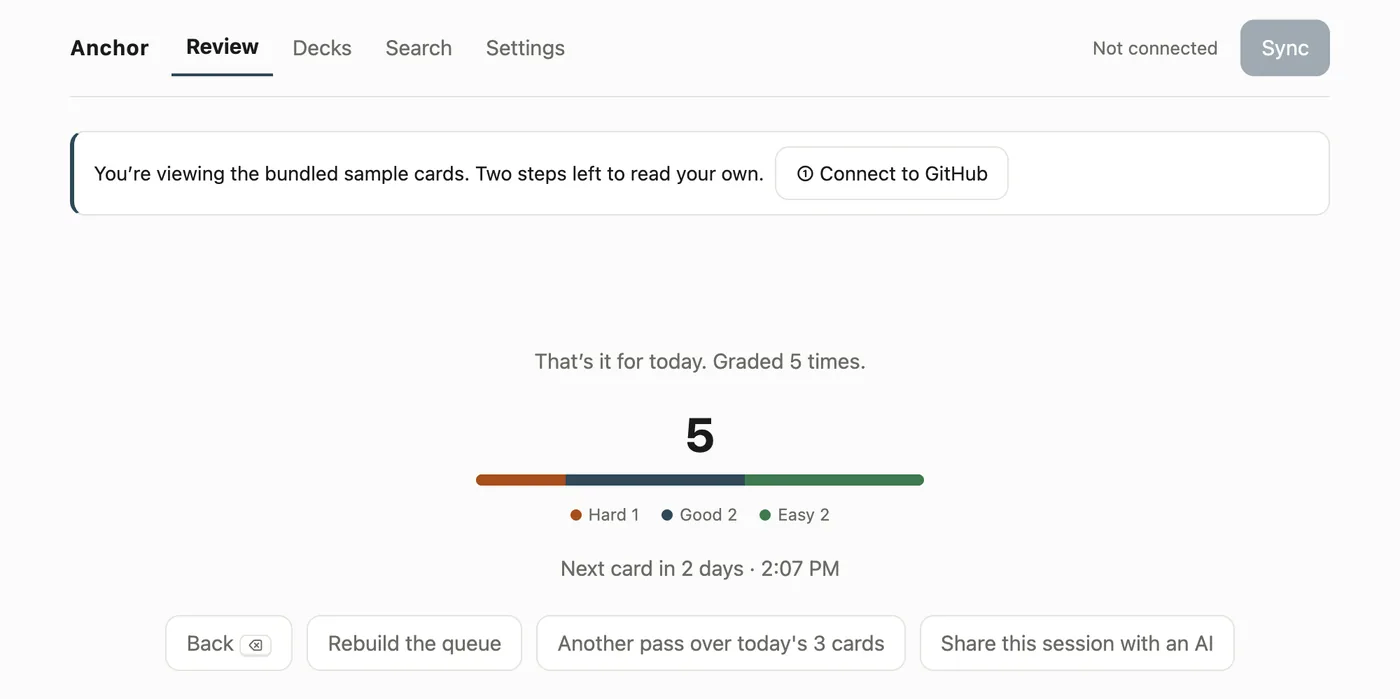
Once you are through, cards FSRS pushed out by days do not come back that day. For the cram before an exam, the finish screen can re-queue today’s cards. They come in the order you first saw them today. Second-pass grades are appended normally, and the scheduler sees both.
Type your answer and compare (rubrics)
If a card has a 🎯 line (keywords separated by 、 or ,), an answer box appears before you flip.
- It is collapsed by default. Nothing changes if you ignore it
- Type an answer, press “Show answer”, and a checklist appears with the back (keywords you hit are ticked)
- Even with no input you get the plain, unticked list — just comparing is enough to notice what you thought you had but missed
- Matching is substring, case-insensitive, and nothing else. Full-width and half-width forms are folded together
- A
|inside one item means “any one of these” (due process|procedural fairness) - The result is stored nowhere. The scheduler’s only input remains your own four-step grade
- Cards opened from Browse show the keywords as a list and do no matching
Rubrics work on v1 cards only. In v2,
🎯is ordinary body text and splits nothing.
Progress, and how a session ends
While reviewing there is a thin progress bar; once you are through, the four-grade breakdown appears as a single horizontal bar.
The denominator is monotonic. The numerator counts cards you have seen at least once; the denominator is seen + waiting to reappear + not yet shown. Using “graded + remaining” would stretch the denominator every time you press “Again” and push the bar backwards — so the more honestly you press “Again”, the less you would appear to progress.
There are two ways to finish.
- Cleared it: nothing left. If you skipped cards, it says so
- That’s it for today: you call it. The heading adds “(N left for next time)”, and “Keep going” takes you back
Because due cards pile up without a cap, anyone with a backlog can never structurally reach the first one. Something without an ending does not become a habit, so there is a second exit.
The finish screen shows three things and no more: today’s grade count, the breakdown bar, and when the next card is due. No confetti, no XP, no streak — making continuation itself the reward creates an incentive to grade carelessly for volume. What the app wants to increase is not the number of grades, but the number of things you can recall.
Only when you have graded nothing does it show as “nothing to do” rather than an achievement.
Odds and ends
- Haptics (iOS): grading answers back. “Again” lands heavy, progress lands light, clearing a session is a success tap. If haptics are off on the device, the OS ignores them silently
- Motion (iOS): the back slides in from below; cards cross-fade. Reduce Motion turns it off
- Speech (iOS): “Read cards aloud” in settings speaks each face as it appears. The language is detected from the text, so vocabulary decks in another language are not mangled. Off by default
- Keyboard:
1–4to grade,Space/Enterto flip,sto skip,⌫for back one (Split View on iPad, and Mac)