
Anchor Cards
A flashcard app for the AI eraThe AI writes the cards.You just remember them.
Anchor is a spaced-repetition app that quizzes you on cards your AI agent wrote, right before you would forget them. How much you have learned shows as a percentage per subject.
To start, give your AI agent this one line
Read https://www.ura-logi.com/anchor/start.txt and walk me through getting started with Anchor, step by step.Paste it into the AI agent you use, as long as it can read a URL. It asks what you want to learn and takes it from there, starting with the cards. No sign-up needed.
Get the app first:App StoreGoogle PlayMacUse it in your browser
YouRead …/anchor/start.txt and walk me through it
AIWhat do you want to learn, and by when? Then I will write the cards, put them in Anchor Cloud, and give you a code for the app.
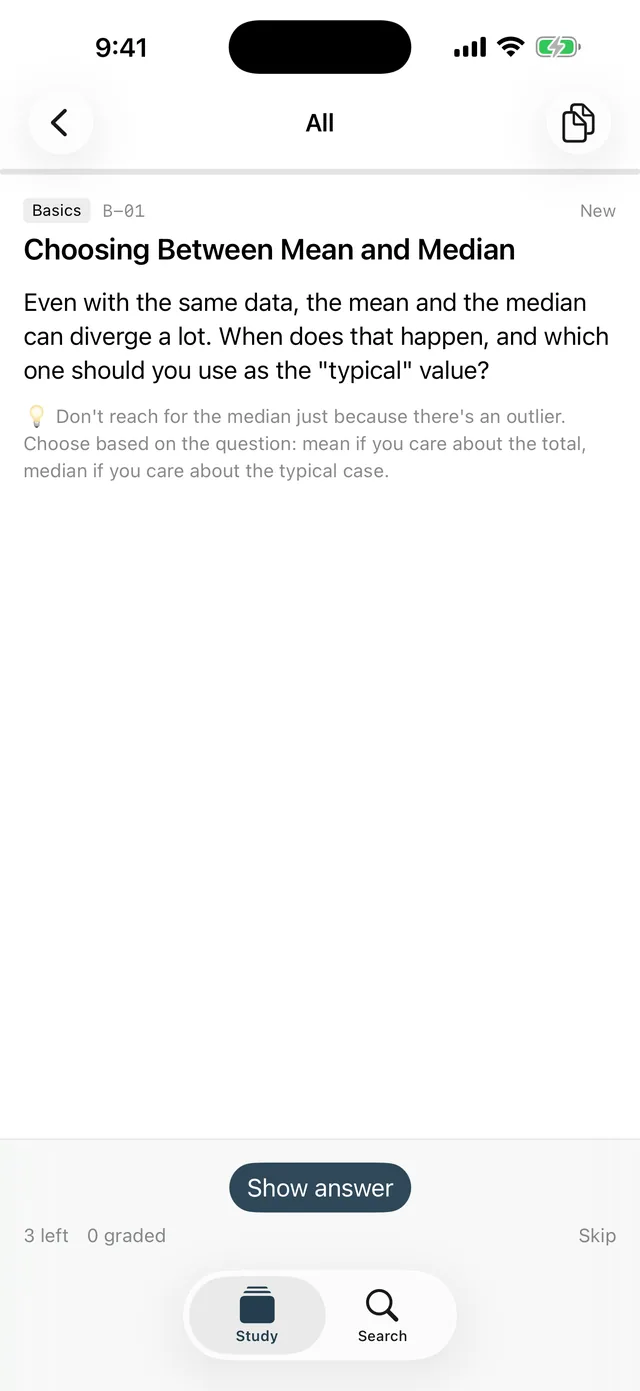
Start
Three steps. Nothing for you to write.
- 1
Copy it, paste it to your AI
Paste the line above into the AI agent you already use.
Having cards written - 2
The AI asks, then writes
It asks what you want to learn and by when, reads the format spec, writes the cards and puts them in Anchor Cloud. It gives you an 8-character code for the app.
Card format - 3
Connect the app, and study
Install Anchor, enter the code in "Connect with code" in settings, and sync. Those cards become your quiz. Prefer GitHub? That path is there too.
Getting started
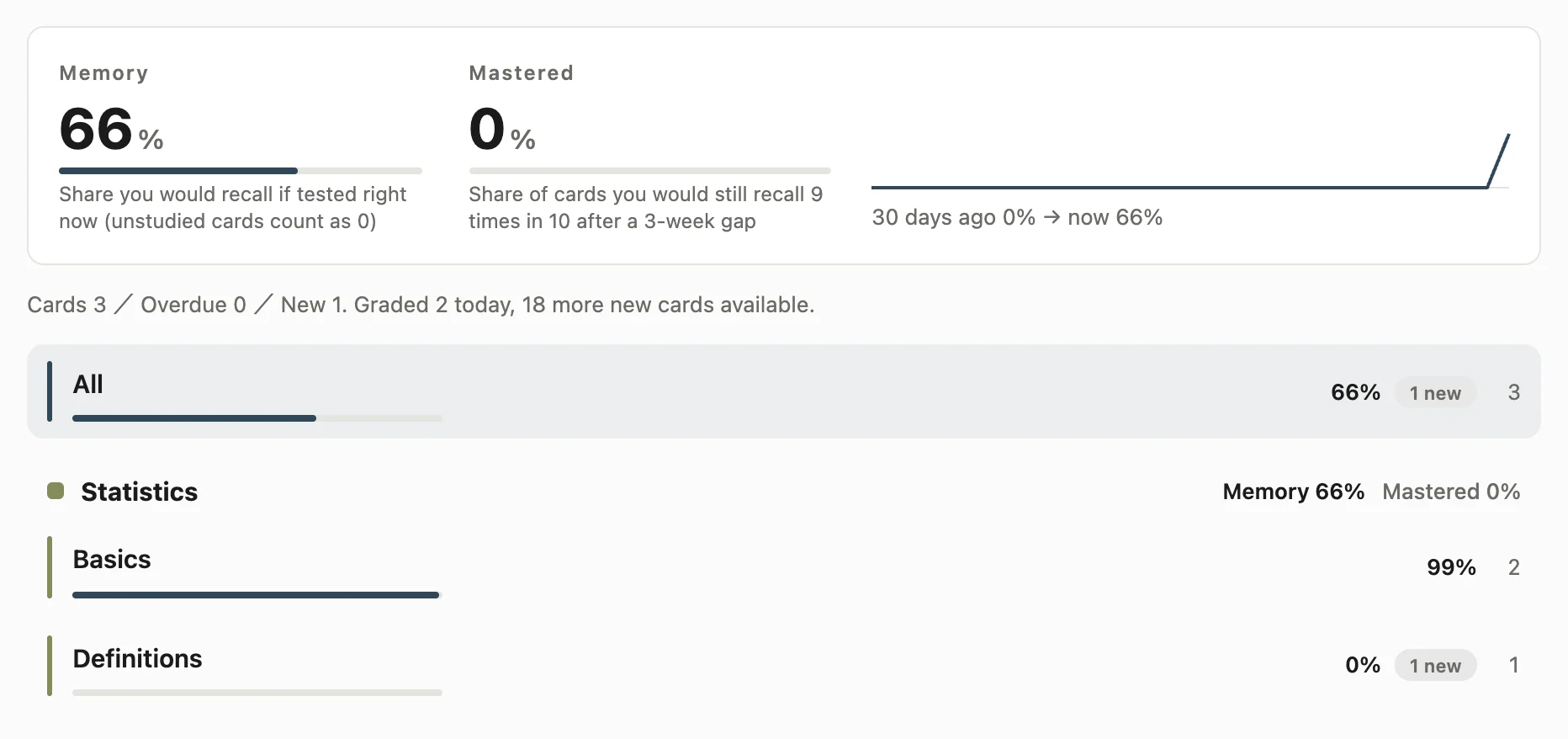
Memory
See how much you have learned, as a percentage
"12 cards due today" only tells you how much to do today. Anchor adds up the probability FSRS holds for each card — how likely you are to recall it right now — and shows it as a percentage per subject, deck and card.
- Memory
- How much you would recall if tested right now. Cards you haven't studied count as 0. Averaging only studied cards would always hover around 90%, because FSRS schedules reviews to keep you there — a number that says nothing.
- Mastered
- The share of cards you would still recall 9 times in 10 after a 3-week gap. Memory dips before every review and never sits at 100%; this one only drops when you forget, so it's the number to build toward 100%.
- 30-day trend
- Nothing is stored as state — it's recomputed by replaying your review log. So as long as the log exists, the past 30 days are filled in even the first time you open this screen.
How it works
Recall it just as you are about to forget, and it lasts longer next time
A memory has two quantities: the probability you can recall it, which falls over time, and its stability — how many days it takes for that probability to drop to 90%. Those two are all Anchor looks at when it decides when to show a card.
01
Every successful recall stretches stability
Recall a card correctly and the days until it falls to 90% grow. Forget it and they shrink.
02
Harder recalls stretch it more
In FSRS, the lower your recall probability was when you got it right, the bigger the jump in stability. Reviewing something you'd easily remember gains little.
03
So it asks as you cross 90%
Too early and the gain is small; too late and you forget and stability shrinks. Anchor computes the point in between — as recall crosses 90% — for every card, which keeps things memorised longest for the fewest reviews.
Fixing
Spot a mistake, have the AI fix it on the spot
Copy a card with a wrong explanation straight from the app and hand it to your AI. The fixed card arrives on your next sync (on GitHub, as a pull request you can read inside the app). A list of the cards you keep forgetting is written alongside your cards too, so the AI also knows what to add next.
Changes (PR) tab
Docs
The whole spec is public
Written to match what the apps actually do. Your AI agent reads the same pages.
Start here
- What Anchor Cards isA spaced-repetition app that holds no cards of its own. Your cards are Markdown in Anchor Cloud or your GitHub repo; the app only reads them and quizzes you.
- Getting startedInstall it, try the bundled samples, then have your AI put cards in Anchor Cloud and connect. The GitHub path is still there for people who want to own the files.
Cards
Using it
- ReviewingThe order cards come in, what the four grades mean, undo and re-run, and how to read the progress bar.
- BrowsingPulling up a specific card outside the queue. Search runs entirely on the device, and nothing here is graded.
- Changes (pull requests)Read the `.md` files in an agent's open PR — as cards — before you merge.
How it works
Settings and platforms
- SettingsWhere your cards live (Anchor Cloud / GitHub), sync, new cards per day, and current status. There is almost nothing to type.
- Anchor ProThe only difference is how many new cards you can start per day. One-time purchase; everything else is in the free version.
- Privacy and safetyIt talks only to where your cards live — Anchor Cloud or GitHub. Anchor Cloud needs no account and holds nothing but your cards and review log. No analytics SDK is included.
- Platform differencesiOS, Android and macOS read the same cards and the same review log. Where they differ, they differ on purpose.
FAQ
Can I use it without a GitHub account?
Yes. Anchor Cloud is the default home for your cards, and it needs no GitHub, no sign-up and no email address. GitHub remains an option for people who want to own the files or already use it.
Do I have to write the cards myself?
No. Give your AI agent the one line on this page; it reads the format spec, writes the cards and puts them where they belong. Writing Markdown by hand works too (if you choose GitHub).
Does it cost anything?
It is free. On iPhone and Android the free version introduces up to 20 new cards a day; Anchor Pro (one-time ¥1,500) removes that cap. Everything else — reviews, sync, the memory figures — is free.
Where is my study history kept?
On your device and in the review log (data/reviews/) wherever your cards live. Choose GitHub and it stays between your device and your repository. Only if you choose Anchor Cloud do we hold your cards and review log — never your name, email, device ID or IP address. Either way, deleting the app leaves your cards and history where they are.
Can I continue across iPhone, Android and Mac?
Yes. All three read the same cards and schedule with the same FSRS computation, so after a sync you pick up exactly where another device left off. With Anchor Cloud, use "Add another device" on a connected device and enter the code on the new one.
Can it read my Anki decks?
It does not read .apkg files. Anchor cards are Markdown that people and AI agents can both read and write as plain text — that is the premise the app is built on.
Get it
Start by giving your AI this one line.
Read https://www.ura-logi.com/anchor/start.txt and walk me through getting started with Anchor, step by step.The app is free. On iPhone and Android up to 20 new cards a day (no cap with Anchor Pro). You can also start in the browser without installing anything.
Download on the App Store Get it on Google Play Download for Mac Use it in your browser
Mac 0.1.23 (15MB / macOS 13 or later / notarized by Apple). Distributed directly from this site, not the App Store.
SHA-256: cd52a64bdf2537f6a42b0f8bc16ceb16053c94b31d0dec70fa662fbcd9c23e64
Other things I made
 RecapTrack study time with the least effort possible
 Kotoba VocabLearn English vocabulary through etymology and nuance, not just definitions
 RhythmBring your health data back to your own hands
 ReelJust shoot — your day becomes a record on its own
 Levels TreeTime you put in keeps opening up a skill tree
 WaveIt never writes zero, and your best never disappears
 RetuneSlow it down without changing the key